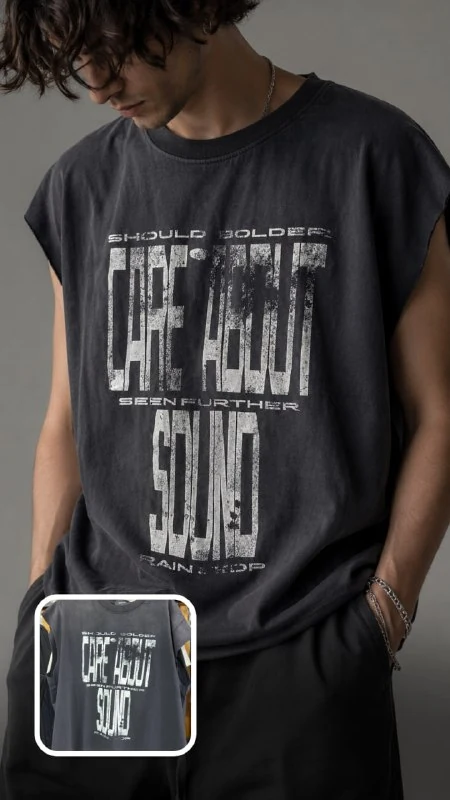
Prepare two different visual sources
The query from by author requires two image roles. The first source is the shooting reference: model, angle, light and framing. The second is a photograph of your T-shirt, which determines the color, pattern and shape of the item. If you attach only a photo of clothing, the team to repeat the reference composition will be left without a specific visual sample.
Choose a reference that clearly shows the back and an appropriate shoulder rotation. Avoid too much overlap with hair, a bag or your hand: such details will make it difficult to place the design. For a T-shirt, prepare a separate shot of the back, where the entire print is visible smoothly and without glare. If the collar and sleeves are important, it is useful to include an additional general view of the item.
In a tool that supports multiple images, make their roles explicit. Name the first file the production reference, the second the original product. The number of files may be more than two, but there are precisely two sources of meaning here: photography and clothing.
Prompt for a close-up shot over the shoulder
T-shirt on the model based on product photos
Use the uploaded reference image ONLY for recreating the exact camera angle, composition, close-up framing, lighting, oversized fit, and premium streetwear aesthetic.
Replace the t-shirt in the reference with MY uploaded t-shirt photos.
Create an ultra photorealistic fashion editorial shot:
— anonymous male model
— European appearance
— face mostly hidden / partially cropped
— mysterious “incognito” vibe
— no strong identifiable facial features
— close-up over-the-shoulder composition
— focus on the back print of the t-shirt
— oversized washed streetwear t-shirt fit
— soft studio lighting
— neutral minimal background
— realistic cotton texture and faded vintage fabric
— premium modern streetwear campaign aesthetic
— same framing and proportions as the reference image
The uploaded t-shirt must be transferred exactly onto the model:
— preserve exact colors
— preserve all graphics and typography
— preserve exact artwork placement and proportions
— preserve original t-shirt fit and silhouette
— do not redesign anything
— do not invent graphics
— do not recolor the shirt
— do not modify the artwork in any way
The final image should look like a real luxury streetwear editorial photo featuring my exact t-shirt realistically worn by the model.
Ultra realistic, fashion photography, cinematic soft shadows, highly detailed fabric texture, realistic print quality, premium streetwear campaign, photorealistic, 85mm lens, 8k.
Negative prompt:
visible detailed face, smiling, anime, cartoon, altered t-shirt, different graphics, fake typography, blurry print, extra logos, unrealistic fabric, distorted body proportions, AI-looking image, bad lightingStart reference image ONLY limits the use of a staged sample. It is suggested that you take the camera angle and lighting from it, not someone else's T-shirt design. The following command MY uploaded t-shirt photos turns attention to your product. Read both phrases together before posting, otherwise they may be perceived as describing one image.
The posted request is for a cross-body look with a print accent on the back. The post images show frontal shots; for this view, replace these instructions in the work request.
Close-up over-the-shoulder composition sets a glance over his shoulder. Therefore, the request is primarily suitable for displaying the print on the back. For an item with a main design on the front, you will need to change both the angle and the indication back print. Simply replacing the product name will leave the old frame logic.
Match the fit to the real thing
The source references several times the loose fit and the fabric having a faded vintage look. This is the art direction of a specific example. If your T-shirt is fitted, new, or made from a different fabric, remove these requirements and describe the actual fit. Otherwise, a beautiful image may show the buyer another product.
There is also a potential contradiction: a free silhouette is taken from the reference, and below it is requested to accurately preserve the original shape of the T-shirt. When these forms are different, determine the priority in advance. For advertising a specific item, its actual proportions, sleeve length and the nature of the fabric are more important.
An anonymous model with a partially cropped face helps keep the attention on the clothes. But the trim should not hide the shoulder seams and collar, if they are used by the viewer to judge the fit. Check at the same time the expressiveness of the frame and its usefulness for getting to know the thing.
Check the print piece by piece
The phrases preserve all graphics and typography and do not redesign anything express a requirement and do not guarantee an exact transfer. After generation, open the original print and the result next to it. Compare the text by letter, number of elements, shades and distances between parts.
Then check the size of the pattern in relation to the seams. It may look similar, but take up twice the area of the back or be higher than expected. Assess the position of the top edge, the distance to the collar and the indentations on the sides. Such changes are easy to miss if you look only at the general atmosphere.
On the folds, the image naturally bends, but individual letters should not turn into new symbols. If accuracy is not achieved, use the frame as a shooting concept or modify the print in the editor based on the source. The signature on the exact preservation in the request does not replace this check.
Prepare an image for your store page
Leave the version without titles as a standalone frame. In the working layout, add the name of the collection and information about the item in separate layers. Do not cover the print with text: from this angle, it gives the buyer the main information.
Check the frame at a reduced size, then zoom in on the collar, sleeves and fabric. An extra hand, a repeated seam or an unnatural fold spoil the impression even with successful printing. Save the original photos and the final version together so that the next edit can be checked against the same product.
For another image from the same collection, it is better to choose a separate frontal reference rather than cropping from the back. This way the series will show different useful aspects of the thing and preserve the overall setting of the light.
Assets for your next layouts
The finished frame can be assembled with the name of the collection and an explanation in the editor. The Designer's Pack contains materials for further design; The composition of the collection is available on the product page.