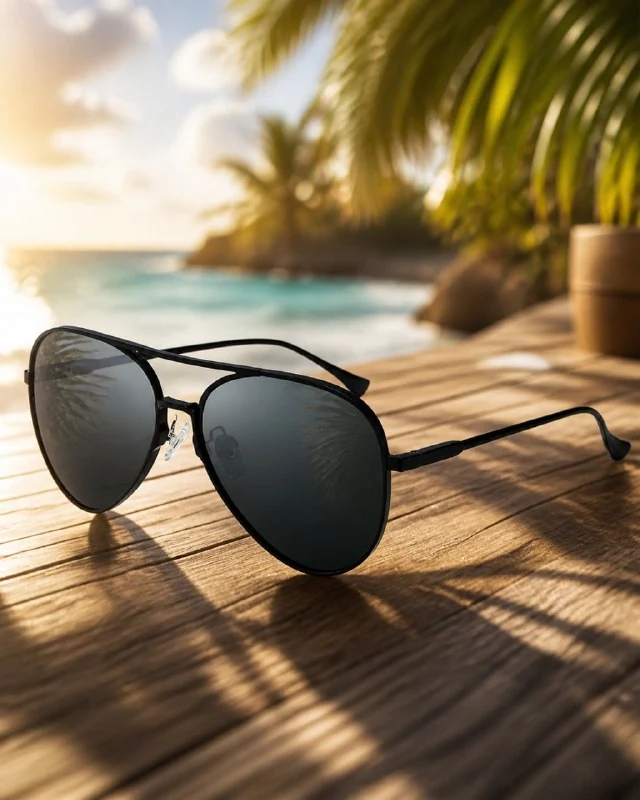
Prepare a photo of glasses for a summer scene
In , the author's comment specifies a specific setting: sunglasses on an illuminated beach deck. Prepare a photo that shows the difference between the shape of the frame, both lenses, and the position of the temples. A random shot on a person’s face can hide exactly those details that need to be transferred into the subject scene.
For the first test, select open glasses from a clear angle. If the logo on the outside of the temple is important, add a photo of that area as a separate visual source. The main photo should show the entire thing so that proportions are not lost.
Upload your photo to an image-enabled tool. The model name alone does not determine the exact shape of the product. Save the source file next to the results: a comparison will be needed not only for color, but also to check the bend of the frame.
Prompt for sun, flooring and reflections
Sunglasses on the beach deck
use uploaded product photo as main focus, vertical 4:5 Wildberries-style premium product card, luxury summer style, sunglasses on sunlit tropical beach deck, soft golden sunlight, cinematic volumetric light and shadows, subtle tropical leaves and ocean reflections, ultra detailed textures with premium material feel, slight motion blur on background for depth, product fully preserves logos, text, brand marks, no text or logos on background, visually striking modern high-end summer aestheticSunglasses on sunlit tropical beach deck specifies the surface on which the glasses lie. Subtle tropical leaves and ocean reflections adds environment. These details should explain the summer context, keeping the subject as the main focus.
The request specifies a slight background blur. It helps separate the product from the flooring and back space, but should not extend to the front edge of the frame or the lettering on the temple. If some of your glasses are out of focus, refocus on the entire subject before adding new effects.
Check the position of the frame on the surface
Find the points of contact between the glasses and the flooring. Their position should be consistent with the open arms and contact shadows. When the thing appears to be hanging above the boards, the beautiful ocean in the background doesn't correct the underlying spatial error.
Align the left and right sides of the frame. Generation can change lens width, bridge thickness, or temple angle. Such changes are especially noticeable in a simple symmetrical design. Evaluate the result next to the original photo at the same scale.
Don't hide the mistake behind a tropical leaf. A sheet covering the edge of the lens or the temple joint deprives the viewer of information about the shape. To correct this, leave the decor at the edges of the frame and free up the entire silhouette of the glasses.
Evaluate lens color separately from sunlight
Warm lighting can make neutral frames appear golden, while cool-toned lenses can make them browner. First compare the color of the front side with the original. Then decide how much you can reduce the warm light on the product while maintaining the summer atmosphere of the environment.
Water reflections should not turn regular lenses into mirror lenses. If all their color is replaced by a bright spot, ask for a less strong reflection and a quieter area of light. Check both lenses: different random scenes inside them may appear as two inconsistent images.
The phrase about preserving logos and markings sets the desired result. After generation, still compare the inscriptions by symbol. The background in the source code should be without text and logos, so it is better to remove unnecessary letters and signs before designing the card.
Build an information card in the editor
The prompt sets the vertical proportions of 4:5 and the summer advertising presentation. The words Wildberries-style do not describe a specific set of your information blocks. Add model name, material and other information in separate layers based on verified product data.
Leave room for one short signature next to the glasses. Do not place text on top of lenses: reflections and letters will begin to compete, and the thing itself will become less visible. If there is no quiet field, expand the layout with a monochromatic area or change the composition of the next generation.
View the finished card in a small size. Glasses should be separated from leaves, boards and sunlight. Save the summer frame without captions and the working file separately. For additional informational images, it is useful to have a simple general view of the product, in which the design can be viewed without the plot surroundings.
Assets for your next layouts
The summer frame can be supplemented with the name and information about the product in the editor. The Designer's Pack contains materials for design; the composition will help you select additional elements.