Prepare the source sneaker photo
Post No. 431 contains poster prompts for different models. They all begin by requiring an uploaded product photo. You therefore need a generator that accepts images as well as text.
Choose a photo showing the silhouette, sole, stitching and markings. A prompt cannot guarantee accurate reconstruction of areas already cropped or covered by a hand. A side view of the complete sneaker is convenient for practice.
Write down the model and store name before starting. The sources use MAJOR, Nike Air Force 1 Light Smoke and Nike P-6000. For another product, replace all corresponding mentions, including text on banner.
Urban-texture version
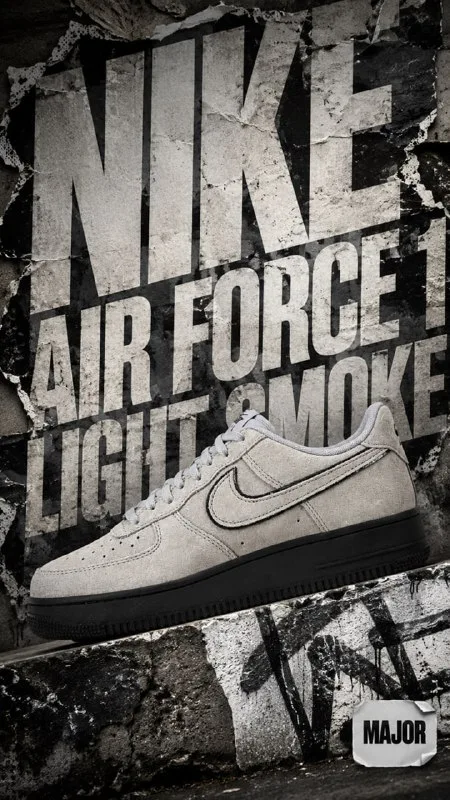
A sneaker poster with large typography
use uploaded product photo as main focus, vertical 9:16 streetwear product card for sneaker store MAJOR, preserve exact sneaker shape, colors, logos, stitching, materials, text and brand marks on product, Nike Air Force 1 Light Smoke sneaker placed in front of massive bold typography in background, oversized model name letters partially hidden behind product, typography acting as a strong graphic element, urban grunge style, layered posters, torn paper textures, rough concrete wall, asphalt details, subtle graffiti influence, dust, scratches, sticker layers, smoky grey palette with light neutral accents, strong contrast lighting, bold shadows, depth and perspective, chaotic but balanced composition, trendy street fashion aesthetic, raw city energy, ultra detailed
text on banner: only small subtle "MAJOR" as a corner store tag and large background typography "Nike Air Force 1 Light Smoke", no other textThe product sits in front of massive background typography. Torn paper, concrete, dust and poster layers create the setting. Do not put all those surfaces over the sneaker: they describe the scene, not changes to the model.
Check the letter overlap. It should convey depth without hiding the entire name. If only random fragments remain, reduce the product or move the word while keeping the main object in front.
Y2K typography version
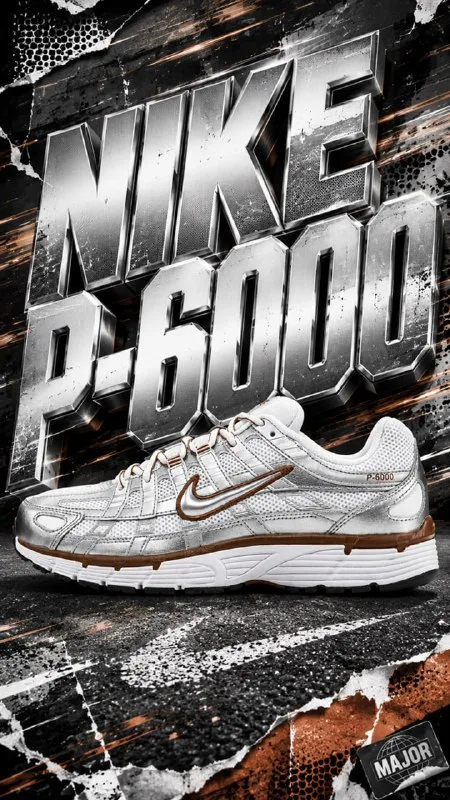
A sneaker poster with Y2K typography
use uploaded product photo as main focus, vertical 9:16 bold streetwear product card for sneaker store MAJOR, preserve exact sneaker shape, colors, logos, stitching, materials, text and brand marks on product, Nike P-6000 sneaker placed in front of massive Y2K typography, oversized 3D letters in background creating depth and perspective, retro running street style, metallic textures, motion blur, mesh patterns, digital stickers, speed lines, asphalt texture, torn poster layers, dust, scratches, high contrast lighting, dynamic shadows, energetic chaotic composition, trendy urban sportswear aesthetic, ultra detailed
text on banner: only small subtle "MAJOR" as corner store tag and large background typography "Nike P-6000", no other textThe second prompt emphasizes dimensional letters, metallic details and speed lines. It organizes the background differently, so compare versions using the same photo of your product.
Motion blur can affect product edges as well as decoration. If that happens, specify a sharp sneaker and limit blur to background lines. Product details matter more than speed in an advertising card.
Check the product separately from styling
Place the result beside the source photo. Compare sole shape, stitching, panel materials, colors and logos. Preserve exact states a requirement but does not confirm it was met.
If generation changes the model, use the result as a background and restore the original cutout product in your editor. Match its shadow, scale and angle manually. This is often more useful than accepting a beautiful but inaccurate card.
Check the model name character by character. The source permits only a small store tag and large background wording. Price, sizes and terms should be separate editable layers.
Assemble the final card
Add a price and one clear caption in a calm area. Keep them away from busy paper seams and bright metallic highlights. At a small size, viewers should recognize the product first, then find information.
Browse free materials for textures and details. The exercise should produce two versions of one poster with a verified product. Choose grunge or Y2K based on which scene supports that model rather than on the amount of decoration.
Assets for your next layouts
Use backgrounds, textures, elements and source files from Designer Pack for further assembly. Free collections are also available on the site; start with them to test the approach.