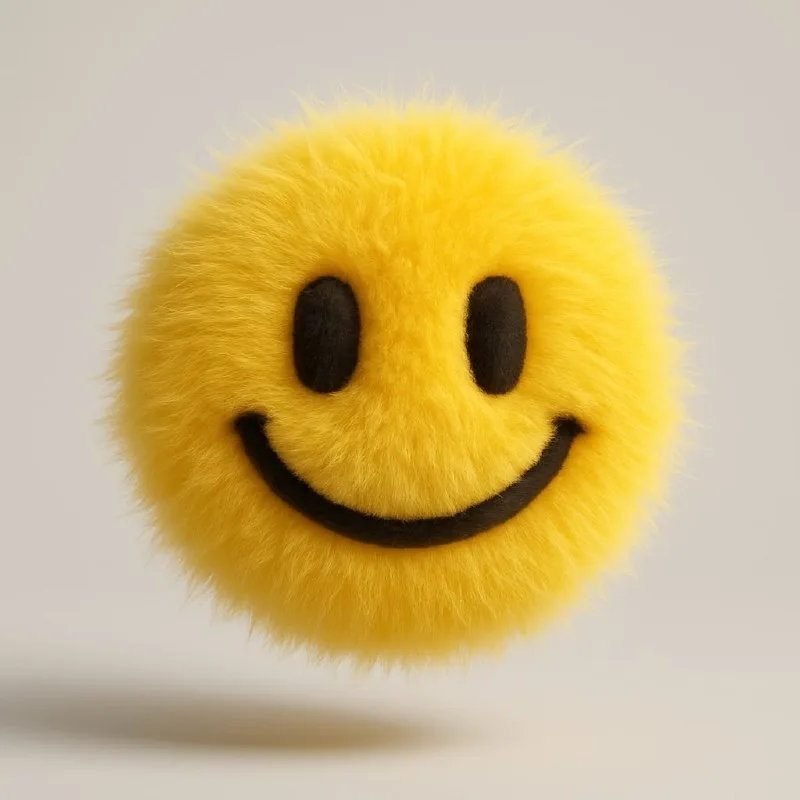
Silhouette matters more than hair count
Post No. 170 proposes turning an ordinary vector icon into a fluffy dimensional object. Try the technique with a heart, star, cloud or smiley. A simple shape is more likely to remain recognizable after adding long fur.
Use a five-pointed star with wide points for the exercise. If the points are thin, fur may join neighboring areas and make the star a shapeless lump. First check the original silhouette at a small size: is it recognizable without color or interior details?
The prompt mentions a vector icon but does not guarantee an exact reproduction of your file. If your generator accepts images, attach the icon as a guide. If using text only, describe the shape: point count, rounded corners and opening positions.
The source prompt and a necessary replacement
A fluffy dimensional object from an icon
Transform a vector icon of OBJECT into a soft 3D object with a fluffy texture and hyperrealistic hair. Use yellow color. The apple floats with soft shadows on a light gray background in a surreal and modern style. Studio lighting, high resolution.There is a mismatch: OBJECT appears first, followed by The apple floats. For a star, replace both mentions with the star. Otherwise the generator receives both your icon task and an apple instruction.
The color is explicit too: Use yellow color. To change it, edit this line rather than adding a second color command at the end. Keep yellow for the exercise so you assess only shape and material.
Fur length changes readability
Hyperrealistic hair points toward individual hairs. This is not quite the same effect as a smooth plush toy. Compare short dense fur and long soft strands while keeping the other conditions.
Short fur preserves corners and interior cutouts more clearly. Long fur looks airier but can hide a smiley's eyes or a letter's opening. Do not assess the material only when enlarged: on a service card, quick recognition matters more.
If the surface looks plastic, “soft” alone may not be enough. Specify individual fibers and an uneven edge. If it resembles a wet animal, check whether the shine is too strong and strands too long.
Floating and shadow should agree
In the source, the object floats above a light-gray background. A shadow shows its distance from the surface: a soft detached shadow looks different from a dense contact shadow beneath a resting toy.
Check for both a shadow immediately beneath the edge and another far below. That combination makes the position unclear. For a static card icon, remove floating and ask the object to stand on the surface: that is a separate choice, not a detail fix.
Assemble a card without unnecessary effects
Place the image next to a short label in your editor. Keep the background calm and text regular: the fluffy object already has enough texture. Use the same visible icon height in a series, or the set will feel inconsistent.
Browse free materials for elements on neighboring cards. Do not mix fur, glass and chrome without a reason: first assemble three fluffy shapes with matching lighting. The exercise should produce recognizable icons, not just three hairy images.
Assets for your next layouts
A finished layout also needs backgrounds, labels and additional icons. Find them among the free materials or browse Designer Pack's contents.