Prepare the selfie and decide what will change
The prompt in the author's comment needs a photograph of one person. Choose a shot with clearly visible eyes, hairline and face shape. A strong filter or wide-angle distortion gives the model an already altered reference against which you must compare the result.
Accept the staging changes in advance. The prompt asks for a raised head, an upward sideways gaze and a black polo shirt. It does not preserve the original pose or clothing. If you need your actual outfit, replace the polo description with the real clothing and check it after generation.
Note a few identifying features: eyebrow line, nose shape, chin and hairstyle. This list helps you assess the face independently of dramatic lighting that may conceal changes.
The editorial staging prompt
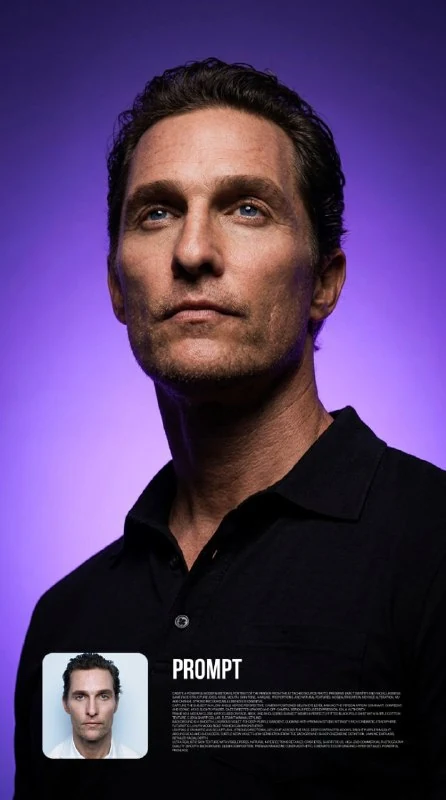
An editorial portrait with purple lighting
Create a powerful modern editorial portrait of the person from the attached source photo. Preserve exact identity and facial likeness: same face structure, eyes, nose, mouth, skin tone, hairline, proportions, and natural features. No beautification, no face alteration, no age change. Strong recognizable likeness is essential.
Capture the subject in a low-angle heroic perspective, camera positioned below eye level, making the person appear dominant, confident, and iconic. Head slightly raised, gaze directed upward and off-camera, serious focused expression, calm authority.
Frame as a medium close-up focused on face, neck, and shoulders. Subject wears a perfectly fitted black polo shirt with subtle cotton texture, clean sharp collar, elegant minimal styling.
Background is a smooth luxurious violet-to-deep-purple gradient, glowing with premium studio intensity. Rich cinematic atmosphere, futuristic luxury mood, bold fashion campaign energy.
Lighting is dramatic and sculptural: strong directional key light across the face, deep contrast shadows, bright purple rim light around head and shoulders, subtle neon violet glow separation from the background. Sharp cheekbone definition, jawline emphasis, detailed facial depth.
Ultra realistic skin texture with visible pores, natural imperfections retained, crisp eyes, sharp focus, high-end commercial photography quality. Smooth background, clean composition, premium magazine cover aesthetic, cinematic color grading, hyper detailed, powerful presence.Preserve exact identity and facial likeness requests resemblance. It does not guarantee an unchanged face. The prompt also restricts age changes and beautification, so compare specific features in the result with the original photograph.
Medium close-up focused on face, neck, and shoulders defines the framing. The shot needs the face, neck and shoulders, rather than just the eyes or the entire figure. For a cover, this gives enough clothing context while keeping attention on the expression.
Control the angle through camera position
Camera positioned below eye level puts the camera below the eyes. Even a small height difference changes the impression: the face looks more composed and the shoulders more prominent. An extremely low viewpoint can enlarge the chin and nostrils, hide the eyes and distort recognisable proportions.
If the angle is too strong, specify a moderately low camera position. Keep the raised head and gaze direction to test only one change. Simultaneously turning the face, introducing a new expression and changing the lighting makes comparison harder.
Examine the neck and collar. They should connect naturally with the head and shoulders. An unusually long neck or odd collar bend can be more noticeable in a small image than minor skin defects.
Separate the purple background from the face
The gradient runs from violet to deep purple, with rim light separating the head and shoulders from it. The lit edge should support the silhouette. A thick, continuous neon strip around the person can resemble a drawn border.
The main directional light shapes the face. Check that both eyes remain visible and that half the nose has not disappeared into deep shadow. If details vanish, reduce facial contrast while keeping the background darker.
The prompt retains pores and natural imperfections. Smooth plastic-looking skin contradicts this treatment. Fix the skin material separately from the background: extra purple colour will not restore lost texture.
Build the portrait layout in your editor
Open the result beside the selfie and check the face, age, hair and skin tone. Then assess clothing and light. Do not judge resemblance by hairstyle alone: a convincing hairstyle can accompany a noticeably altered nose or chin.
Place the heading in a clear area without covering the eyes or shoulder line. Start with a regular light-coloured font. The purple setting already provides a strong accent, so an elaborate lettering effect may be unnecessary.
Save the original photo, the portrait without text and a layered working version. If the image will appear in several formats, check each crop separately: a turned head and sideways gaze need space that is easy to remove accidentally.
Assets for your next layouts
Use separate backgrounds, textures and layout elements to design around the portrait. Browse Designer Pack's contents and choose materials to suit your post.