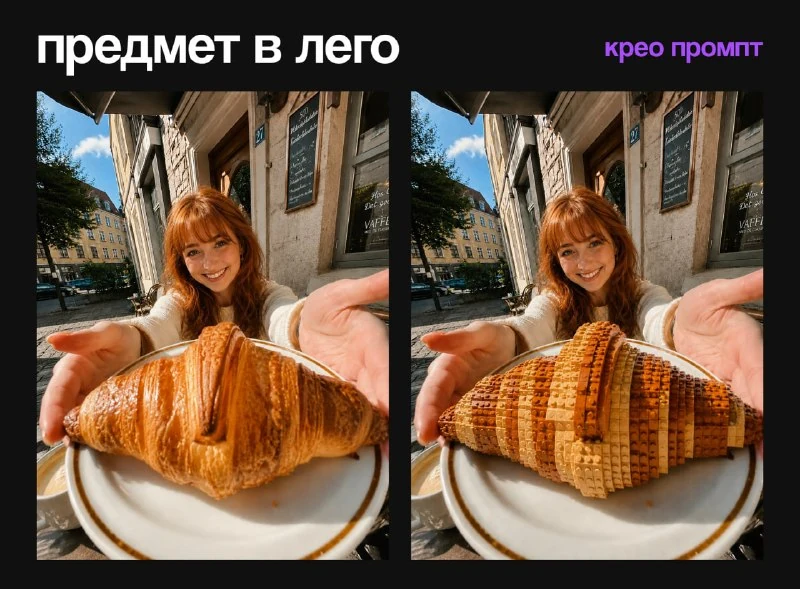
How are the two scenarios different?
There are four treatments in CreoPrompt](https://t.me/creo_prompt/511) publication [. Here we will take two related to plastic blocks: replacing the main item and replacing the environment. They have opposite boundaries. In the first case, the background remains photographic; in the second, the person and his things are preserved, and the space is rebuilt.
Choose a photo with one clear main subject. If a person is holding a cup and a phone at the same time, the word main object may be ambiguous. Before sending, check what exactly is being replaced: a cup in your right hand or an object on the table. This is more useful than adding new quality requirements.
Block subject in regular photography
Item made from plastic blocks
Use the attached photo as the base image. Transform ONLY the main object in the photo into a realistic LEGO-style brick object. If the object is being held, offered, touched, or standing next to a person, keep the person completely unchanged.
The LEGO object must keep the original object’s exact position, size, shape, angle, perspective, colors, lighting, shadows, and contact with the hands/surface. Recreate it from small LEGO bricks with visible studs, plastic texture, brick seams, realistic highlights, and detailed construction.
Do not change the person, face, hands, body, clothes, hair, pose, skin, background, environment, camera angle, framing, lighting, depth of field, or overall photo style. The final result must look like the original real photo, but with only the selected object replaced by a LEGO version.
No cartoon effect on the whole image, no full LEGO transformation, no extra objects, no text, no logo, no watermarkThe query preserves position, size, perspective, and contact with the hand or surface. It is necessary to check each of these connections separately. A cup may look good as a toy, but hover over your palm, change in angle, or become twice as large. This result is not yet suitable for the final collage.
Look at the protrusions and seams: visible studs and brick seams describe a prefabricated structure. The smooth plastic shell transfers other material without joints. If an item is difficult to recognize, reduce the size of the blocks relative to its larger parts, without requiring the same detail everywhere.
Background made of blocks, the person remains real
Background made of plastic blocks
Use the attached photo as the base image. Transform ONLY the background and surrounding environment into a realistic LEGO-style scene, while keeping the person completely unchanged.
The background should be recreated as if it were built from LEGO bricks, including buildings, streets, furniture, plants, walls, objects, and other environmental elements visible behind or around the person. Preserve the original background composition, layout, perspective, scale, colors, lighting, shadows, and depth, but rebuild it in realistic LEGO style with visible studs, plastic texture, brick seams, and detailed LEGO construction.
Do not change the person in any way. Keep the face, hair, skin, hands, body, clothes, pose, expression, proportions, and all details of the person exactly as they are in the original photo. If the person is holding or touching something that should remain part of the subject, keep it unchanged unless specifically intended as part of the background.
Keep the original camera angle, framing, lighting direction, photo realism, and overall image feel. The final result must look like the original real photo, but with only the background replaced by a realistic LEGO-built environment.
No full LEGO transformation of the person, no cartoon effect on the whole image, no extra objects, no text, no logo, no watermark.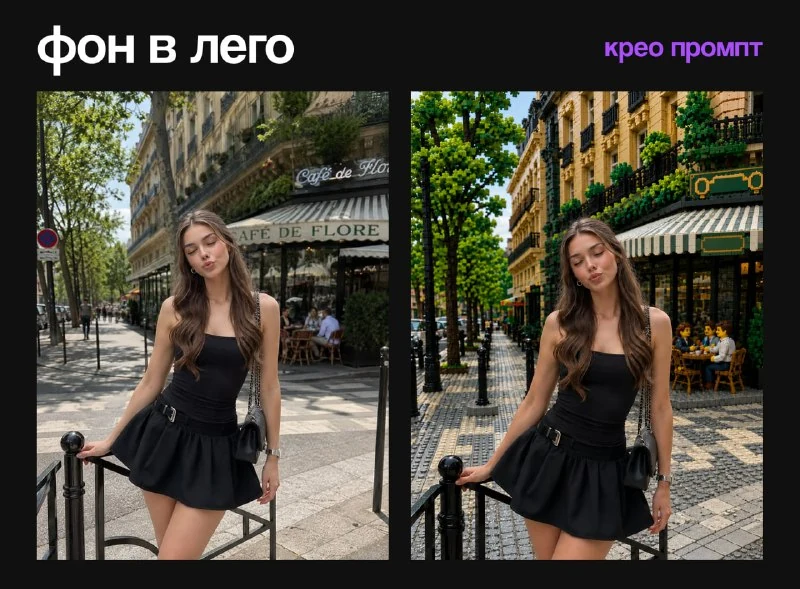
In the second option, buildings, furniture, plants and other elements of the environment change. Their position and scale must correspond to the original photograph. For the first experience, a static street shot or a simple room is more convenient than a crowd with dozens of intersecting figures.
The request specifically specifies the items that the person is holding or touching. If the phone should remain a regular one, say so directly. Otherwise, the generator may consider it part of the environment. The same applies to the chair, bag on your shoulder and bicycle next to the person: determine which group they belong to.
Light and shadow connect two materials
The real hand and the plastic object must have the same light source. Compare the side of the highlight, the direction of the shadow and the temperature of the lighting. A toy with cold studio light inside a warm evening frame looks inserted even with the correct contour.
A small contact shadow is needed at the point of contact. She explains where the fingers wrap around the object and what it stands on. If the model has added new fingers or moved the hand, return the original hand in the editor and adjust the mask around the new design. Don't try to hide an anatomical error with heavy blurring.
Review before publication
Compare the source and the result at the same scale. The face, clothing, number of people and camera position must be appropriate for the chosen scenario. Then scale the image down to post size so that the block seams are readable but not noisy.
Save the versions with the replaced subject and the replaced background separately. From one photo you can make a clear pair of «что меняется» without adding unnecessary effects. If you want a softer material around a real person, check out knitted and leafy background .
Select the inscription for the next layout
For other inscriptions and materials there is Creative AI Typography: 823 prompts with examples, search and sections. In the free demo you can test the approach on your own text.