Select a few recognizable landmarks
A mini-city in a cube is an artistic diorama in which familiar buildings are assembled into a small composition. Such a picture can be useful for the cover of an urban community, a tourist collection or a poster. It does not replace a map and is not required to show the actual location of all objects.
Before generation, select three or four landmarks. A large number of buildings does not always help recognition: inside a small showcase they can merge into a dense background. First, identify one main object, then add several secondary ones. Leave room for roads, greenery and light in between.
For the cover, it's helpful to decide in advance where the title will go. You can place the display case in the center and leave the top part free, or move it to the side. Do not try to fit a long title into the architecture: it is more convenient to type the exact text after generation.
Prompt for miniature Krasnodar
Miniature Krasnodar in a showcase
(Ultra HD, hyper-realistic, cinematic macro shot):
A miniature Krasnodar city displayed inside a half-open transparent display box (like a collector’s showcase). The model features Krasnodar Stadium, Galitsky Park, the Aurora cinema building, and the Cathedral of St. Catherine, surrounded by smaller modern buildings, tree-lined boulevards, and tiny vehicles.
The viewing angle is from the corner, giving a deep 3D perspective of the entire miniature city inside the box. The glass surface reflects soft golden light, while the open half reveals detailed walkways, fountains, and glowing miniature park lamps.
Krasnodar Stadium’s facade glows with dynamic light patterns, Galitsky Park’s geometry is illuminated with tiny LEDs, and the cathedral’s domes shimmer under warm studio light. Depth of field adds realism, making the city appear alive inside the showcase.
Ultra HD, photorealistic miniature textures, cinematic lighting, macro realism, diagonal corner view.The query specifies a stadium, park and other landmarks inside a semi-open transparent showcase. The angled angle helps show depth, and the small lights maintain the miniature feel. It is important to maintain a uniform scale: one building should not accidentally end up the size of the entire city.
If the main subject is lost, cut back on the secondary details. Remove some traffic or reduce building density. When the display looks too much like an opaque box, adjust the transparency of the glass edges and leave one side open.
Prompt for miniature Sochi
Miniature Sochi in a window
(Ultra HD, hyper-realistic, cinematic macro shot):
A miniature Sochi city displayed inside a half-open transparent display box. The model includes the Fisht Stadium, Sochi Park Hotel, Sea Port tower, and the Olympic flame bowl, surrounded by palm trees and winding coastal roads.
Corner viewing angle gives a 3D illusion of the seaside city within the showcase. The open half reveals roads, beach details, and tiny glowing street lamps.
The stadium’s metallic structure gleams, the sea reflects blue light, and the coastline glows under warm evening tones. Macro realism, cinematic lighting, diagonal corner composition.This description puts more emphasis on the coast, palm trees and evening light. Compare it with the first option: not only the list of buildings changes, but also the environment. When adapting to a new city, replace both parts, otherwise random seaside parts may remain next to other landmarks.
Don't just rely on the city name at the beginning. Read the request in its entirety: it mentions specific structures and features of the scene several times. After replacing, check to see if the old name remains inside the description of the light or architecture.
Prompt for miniature Kazan
Miniature Kazan in a showcase
(Ultra HD, hyper-realistic, cinematic macro shot):
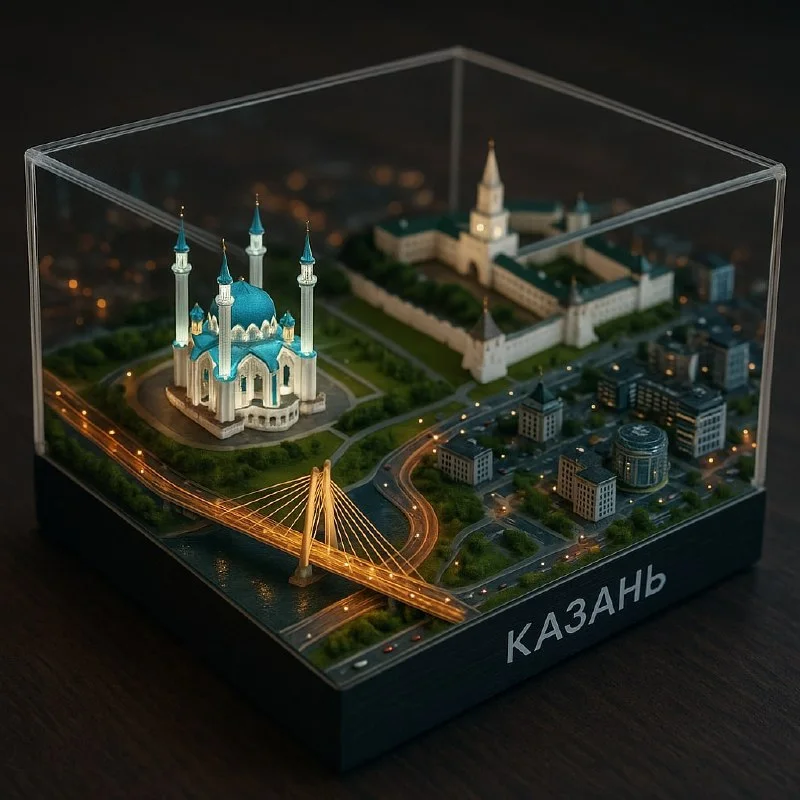
A miniature Kazan city displayed inside a half-open transparent display box. The model shows the Kul Sharif Mosque, Kazan Kremlin, Millennium Bridge, and Riviera complex among modern buildings and small vehicles.
The box viewed from the corner reveals deep 3D layering — glowing roads, green parks, detailed architecture.
Kul Sharif Mosque shines with turquoise domes, the Kremlin’s white walls reflect soft light, and the bridge glows with golden illumination. Photorealistic textures, cinematic macro depth, diagonal corner view.This option matches the idea of the preview at the beginning of the article. The query assembles familiar landmarks into an illuminated artistic composition. Compare how transparent edges and diagonal angles help you see multiple levels of a miniature. This scene does not confirm real geography.
How to adapt a prompt to another city
- Replace the name and list of landmarks. It is better to use a few familiar objects than a dozen inconspicuous ones.
- Choose your environment: river, coast, park or dense urban area. It should support your idea.
- Keep one angle and type of storefront if you are creating a series for several cities.
- Check the time of day and general light. Don't mix bright daytime sun with nighttime lighting for no reason.
- After generation, check the result using photographs of those objects that should be recognizable.
A neural network can come up with a facade or mix several buildings. If recognition of a particular object is important, use a suitable visual reference when the tool supports it, or refine the composition manually. Do not label the approximate silhouette as an exact architectural model.
Preparing the cover in the editor
Place the diorama on the layout and add the title on a separate layer. First try a regular font with enough contrast. If the scene itself is detailed, decorative lettering can overwhelm the cover. Set aside a complex effect until you check the overall composition.
Look at the preview size image. Small cars and lights may disappear, but the silhouette of the storefront and the main building should remain clear. If the entire composition turns into a dark blur, lighten the background or choose a result with a simpler environment.
Keep the margins and title position the same throughout the series. This way, covers of different cities will be perceived as one selection. If you need a large decorative initial next to your diorama, see prompts for individual letters .
Select the inscription for the next layout
For a cover with a miniature city, you can separately prepare an expressive title. In Creative TyPography - 823 prompts for inscriptions with examples; start with a free demo.