What should form the object
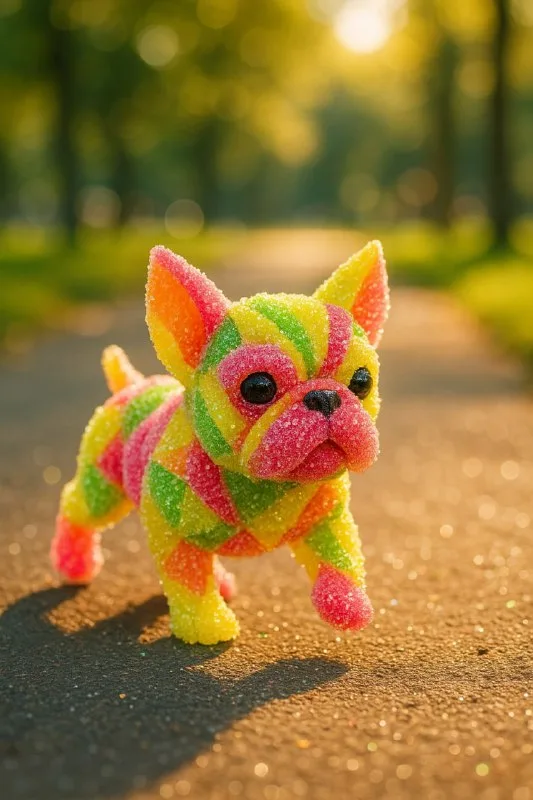
In the original post about candy objects, candies form the character's body. This differs from an ordinary object with sweets scattered around it. To try the technique, choose an object with a clear outline: a pear, star, small house or simple toy.
Use a pear for the first exercise. Its wide lower part, narrow top and short stem make the shape recognizable even in an unusual material. A thin bicycle or complex mechanism is harder to build from separate candies: small details quickly become random protrusions. Start with a large silhouette and add complexity after a successful version.
Decide which details will keep their usual material. The stem, for example, could also be made of candy or remain wooden. If the prompt does not specify this, the model will choose. For a series of objects, establish one rule: the entire object consists of candy, including small parts.
The source prompt and two important edits
An object made of sugar-coated sour candies
A tiny YOUR OBJECT crafted entirely from sharp-edged, sparkling sour candies in neon yellows, lime greens, and electric pinks. Its body glitters with a sugar-coated surface, each piece reflecting tangy brightness. The YOUR OBJECT scampers energetically across a lively park path, the ground subtly shimmering with candy-like sparkles. Cinematic sunlight highlights the glossy sour candy texture, giving the little dog an electrifying, vibrant glow. Designed for smooth.Replace both occurrences of YOUR OBJECT with your object. Then read the rest of the prompt. It contains little dog: if you are making a pear, those words contradict the new task. Replace them with the object's name or remove the dog sentence entirely. Replacing only the first placeholder is not enough here.
The ending Designed for smooth. is incomplete. For a still image, it does not describe a useful property and can be removed. This shows why it is worth reading the entire ready-made prompt, even when you keep its main idea.
Another choice is movement. Scampers describes a running character. For a product-style pear image, change the action to a resting position: the object stands on a light surface. The sugar texture and candy colors will remain the main task.
Sugar, jelly and plastic look different
In the prompt, sugar-coated surface describes the sugar coating, while glossy sour candy texture describes the candy's shine. If the surface resembles smooth plastic, strengthen the description of small sugar crystals. Adding another bright color will not solve the material problem.
Check whether the separate pieces are visible. A useful result for this exercise shows the candies' volume and small gaps between them while keeping the overall outline. If you get a continuous smooth shell, ask for separate small candies. If the silhouette falls apart, reduce the candies' size relative to the object.
Initially keep the three source colors: yellow, green and pink. For a calmer image, try one main color and a small secondary accent. Compare versions against the same background; otherwise it is hard to tell whether the material changed or only the impression of its surroundings.
Compose an advertising image
The park path in the source prompt suits the character but takes up space in a product banner. If you need a headline alongside it, choose a plain light background and place the object in one part of the image. Ask for the other area to remain clear.
In your editor, add a short title and one explanatory line. Avoid coloring every word in different candy colors: the object already provides a strong accent. You can browse free elements and backgrounds for additional decoration, but check the composition without them first.
Save the original object, prompt and version with text separately. Another channel technique may help with your next idea: an object that turns out to be cake. Recognizing the outer shell also matters there, but the main effect comes from the exposed interior.
Assets for your next layouts
You may need other elements to assemble the image: backgrounds, objects and accents. Designer Pack organizes them into folders, so you can check its contents and choose assets for your next layouts.