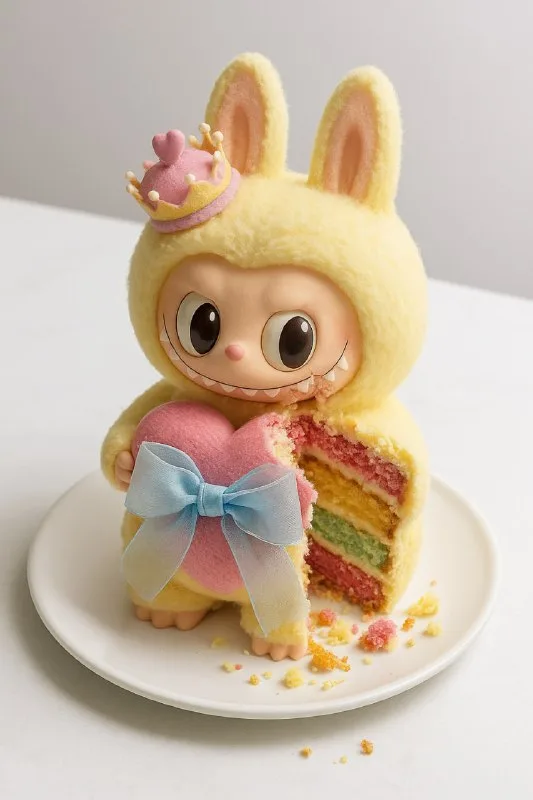
Choose an object with a distinctive shell
Post No. 160 suggests turning any object into cake. For the first exercise, use a sneaker, camera, bag or fruit. Their recognizable outlines and surfaces can contrast with the soft interior.
Imagine where the bite will be. Removing half the object makes it hard to recognize. If the damage occupies a tiny corner, viewers may mistake frosting for an accidental stain. Start with a small but clearly visible area at the front.
For a practice camera, the body should keep its shape while the bite reveals layers in one place. Do not ask to cut the lens, body and button at once: many exposed sections turn the object into an ordinary dessert.
The object-cake prompt
An object that turns out to be cake
Generate a hyper-realistic digital illustration of a cake meticulously stylized to resemble a [Ваш объект], resting on a pristine white table. Show it partially bitten to reveal multiple delicious layers (sponge, frosting, crumbs) and shatter the illusion. Capture the moment of surprise with intricate details in the bite mark. Use a slightly overhead angle to emphasize the contrast between the realistic outer shell and the cake interior. Illuminate the scene with soft, diffused lighting to enhance textures and cast subtle shadows for depth. Keep the background minimal and bright to focus on the deceptive dessert. Employ a vibrant, playful palette for the cake layers against the object-mimicking exterior. Render in a photorealistic style with whimsical undertones, making the reveal both visually convincing and appetizing.Replace [Ваш объект] with a specific name. It helps to describe a couple of distinctive shell details: body shape, color and material. Avoid listing a dozen features before the basic exposed-interior effect works.
Partially bitten specifies a bite. For a neat confectionery cut, replace it with a description of a removed slice and its edge. These choices create different moods: a bite feels spontaneous, a clean cut demonstrates construction.
The source specifies a white tabletop and minimal bright background. They separate a dark shell from crumbs. If the object itself is white, change the background to soft gray or warm beige while keeping a clear shadow underneath.
Layers should fill the interior
Check where sponge and frosting run. They should sit inside the shell rather than float in front as a separate cake slice. The shell thickness should match the object's shape: an excessively thick “crust” can look like a box placed over a dessert.
Sponge, frosting, crumbs specifies three distinct details. If the cut becomes a smooth colored slab, describe porous sponge and separate frosting layers. If there are too many crumbs, reduce them: the main effect should happen on the object, not on the table.
The filling color can relate to the shell or deliberately contrast with it. Try light sponge with a red layer for a dark body. First compare two fillings at the same camera angle to assess visibility without changing the scene.
An angle that shows both ideas
The slightly overhead source angle shows both the object's shape and the exposed surface. A strictly side-on view may hide the bite behind the front edge. A steep top view can remove the familiar silhouette.
If the cut is at the back, ask for the damaged side to face the camera. Keep the object position consistent across versions so you do not need to find a new text area each time. Check a reduced image: the unexpected interior should remain visible even in a small preview.
For a simpler material change, try the candy-object prompt. There the entire object consists of sweets, so the requirements for the outer shell differ.
Use the image in advertising
Choose one sentence explaining the offer without covering the bite. The unusual object already attracts attention; a long headline over it can obscure the scene's meaning. Free backgrounds and elements offer decoration, but the first version only needs the object, shadow and text.
If this is a confectionery concept, label it as an idea sketch until the actual item exists. Use verified photographs to advertise a finished product. Save the prompt and clean image with the layout: the cut position and filling layers will help prepare the next image in the series.
Assets for your next layouts
Use the illustration in a banner or series of posts. Designer Pack offers backgrounds, accents and PSD templates for assembling layouts; its contents are shown on a separate page.