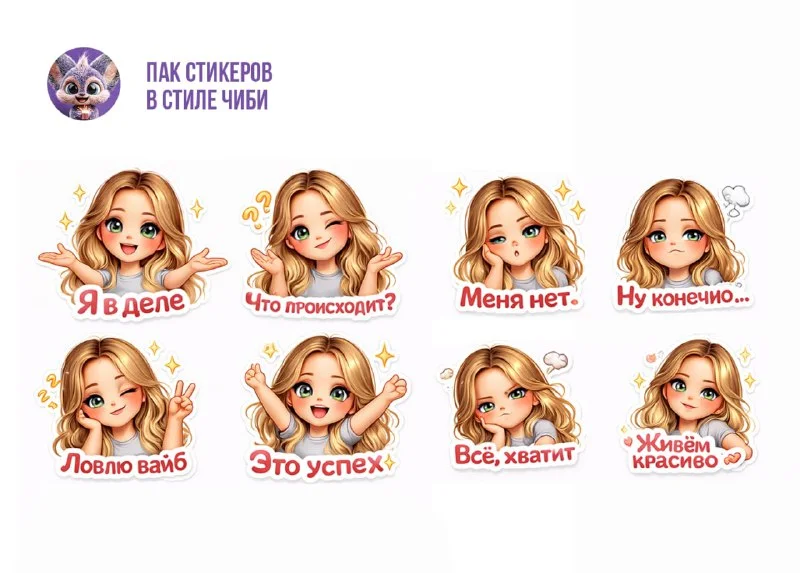
Which photo to choose for a sticker pack
It’s more convenient to start a sticker pack from your photo with a clear portrait, where the face and hairstyle are clearly visible. Complex angles, large glasses and strong shadows can make it difficult to convey characteristic features. Choose one photo as a base rather than multiple photos with completely different lighting.
Below is a prompt from an open channel: he asks for eight emotions, a recognizable face, cartoonish proportions and Russian signatures. This is a request for images, not an automatic installation of a set in Telegram. After generation, you will need to prepare separate files and go through the publication stage through the messenger tools.
The word Premium appears in the source text. Here it describes the desired flow and quality of the drawing; in itself it does not specify the type of the future set. It is more important to get the right emotions and easy-to-process images than to save this word in a tailored query.
Prompt for eight emotions
Eight stickers based on photos
Create a set of 8 ultra-cute Telegram Premium stickers based on the uploaded photo.
The character must clearly resemble the person in the photo:
keep the same face shape, freckles, eyes, lips, nose, hair color and hairstyle.
Style:
super cute chibi cartoon, big sparkling eyes, slightly oversized head, soft rounded face, smooth glossy shading, pastel colors, soft glow, 3D cute look, Pixar-like, kawaii style, premium quality.
The character should look adorable, friendly and expressive, but still recognizable.
Background:
transparent background only, clean sticker cutout, no background, no shadows, no objects behind.
Text rules:
– Use only correct Russian
– Bold, cute sticker font
– No spelling mistakes
– Large and readable
– Well centered
Create a high-resolution, ultra-detailed image suitable for professional Telegram Premium stickers.
Create 8 different stickers with unique poses and emotions:
1. Confident and cheerful, arms open
Text: "Я в деле"
2. Cute confused look, palms up
Text: "Что происходит?"
3. Playful wink, peace sign
Text: "Ловлю вайб"
4. Sleepy and tired, head resting on hand
Text: "Меня нет"
5. Very happy and excited, arms raised
Text: "Это успех"
6. Cute sarcastic face, one eyebrow raised
Text: "Ну конечно…"
7. Slightly angry but adorable, arms crossed
Text: "Всё, хватит"
8. Relaxed, confident, stylish smile
Text: "Живём красиво"
All stickers must:
– Be in the same cute cartoon style
– Have glossy shiny highlights
– Look premium
– Be perfect for Telegram sticker pack
– Have clean edges and smooth outlines
– Be high-resolution and sharp with no blur or pixelation
– Have a fully transparent backgroundAttach the selected photo and insert a request. You can save the English instructions, and replace the Russian phrases inside the quotes with your own. Re-read each signature before sending. It is better to choose short cues that you will actually use: they are easier to test and fit into a small image.
The prompt lists the facial features that must be preserved. If some feature does not suit you, correct the description. For example, there is no need to demand freckles that are not in the photo. The basis should remain the person's appearance, and not a random list of details.
If eight stickers turned out to be one sheet
A neural network can collect all emotions in one image. This sheet is convenient for viewing ideas, but each sticker will still need a separate file. Check that there is enough space between the characters and that the captions do not touch adjacent drawings.
If characters are too small or cropped, generate emotes one at a time. Save the selected style and description of the face, and leave only the desired pose and cue in the list. A successful image can be used as a guide for the next ones if the tool supports references.
Don't change your hairstyle, clothes and head shape with every emotion. Get a consistent character first, then add expressions. If the face in one sticker is different, it is better to correct that option separately than to accept an unrelated set.
Processing in a graphic editor
- Divide the common sheet into separate images, saving the source.
- Remove the background and test the transparency on a colored background. The drawn checkerboard grid is not true transparency.
- Adjust the mask around your hair, fingers and letters. Remove any stray stains or edges from the adjacent sticker.
- Retype the signature manually if there are errors in the generation. Maintain a consistent font and text position throughout the set.
- Check out all the images side by side and in small size.
The outline should separate the character from the chat background. At the same time, too thick a stroke can obscure small facial features. Find the thickness at which the face is readable on both light and dark backgrounds. The signature should not be larger than the facial expression itself.
Checking the series before publication
Put all eight options into one working layout. Compare head size, hair color, clothing and highlight style. Then read the signatures separately. Even a neat cartoon drawing should not be left with an extra letter or an incorrect ending.
To publish, use the official Telegram bot for stickers and follow its current requirements for the selected type of set. Here we are preparing the visual basis, so the technical parameters of the export need to be verified at this stage.
If you need a brand character instead of a personal portrait, check out plush and knitted mascot designs . There, the task begins with the characteristics of the character, and not with a photograph of the person.
Select the inscription for the next layout
There is a separate Creative AI Typography for lettering on covers, banners and other layouts. The full library contains 823 prompts with previews; Several effects can be tried for free.