Choose the jewelry before the story
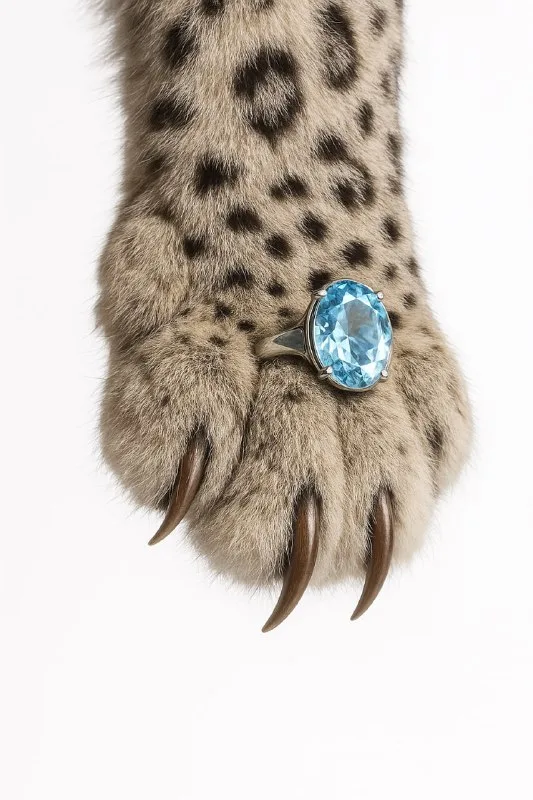
In the original post, a ring is worn on a cheetah's claw. A white background and soft studio lighting focus attention on the jewelry and paw texture. This is easier to control than a long story with an animal in a landscape.
For a practice version, define the ring's shape: a plain band, large stone or several small inlays. Decide which feature matters most. If you are promoting a specific item, prepare a photo clearly showing its setting. An invented advertising concept and an accurate catalog image have different fidelity requirements.
Choose the animal by silhouette and texture. A spotted paw provides an active pattern; a plain one offers a calmer backdrop for metal and stone. Do not change animal, jewelry and lighting simultaneously: start with one change to see its effect.
The source image prompt
A ring on a paw: an editorial product scene
Close-up of a cheetah's paw and claws with a large diamond ring worn on one claw. The paw hangs down evenly from above. Luxurious editorial style, soft studio lighting, sharp focus, white background, high fashion, surrealism,
4K, style photographicCheetah's paw and claws specifies the animal, while large diamond ring worn on one claw defines the ring's position. When replacing the animal, read both descriptions: the chosen character needs a suitable paw and claws. The general word “animal” gives the model too much freedom.
The paw hangs down evenly from above defines the direction. If the paw enters from the side, change this sentence rather than adding an opposing instruction. Keep the white background and soft light for the first test: they help assess geometry without decoration.
If the tool accepts photos, attach your jewelry image and explicitly ask to use it as the jewelry reference. Still compare the result with the original. Asking to preserve the product helps, but does not replace checking the setting, stone count and metal thickness.
Where the object logic often breaks
Examine the ring opening and its connection to the paw. Sometimes the jewelry becomes a bracelet, lies on the fur without contact or has two incompatible circular outlines. Choose a result where its spatial position makes sense.
Check the number and direction of claws. A claw passing through a stone will look wrong even to someone unfamiliar with the original item. Describe a local correction as one task: restore the ring's contact with the chosen claw while preserving the rest.
Scale matters as much as anatomy. A tiny ring becomes an incidental highlight; an oversized one hides the paw and looks like a separate object in front of it. Choose a size that makes both the jewelry and the unusual concept clear.
Lighting for metal and stone
Under soft studio lighting, silver, gold, clear stone and fur should still look different. If everything appears equally white, specify metal color and light direction. A heavy black contour around the stone often makes it look plastic.
Do not try to fix the material with general sharpening. First assess highlights: they should reveal the setting and facets. Then inspect small details at a larger size. For a banner, a readable jewelry silhouette matters more than numerous sparkles around it.
Build a layout around the scene
Keep the collection name short and put product features in a separate calm line. Use the white background as part of the composition without cutting out every hair. Browse free materials for a draft setting, but avoid backgrounds that obscure the light-colored setting.
If you need a decorative headline, compare it with liquid-gold lettering. Color can connect the name to the jewelry, but the product must remain the focus. Save the image without text and a separate editable layout containing the price and terms for easier updates.
Assets for your next layouts
Designer Pack contains objects, backgrounds, textures and ready-made scenes for advertising layouts. Browse the contents by folder before buying.