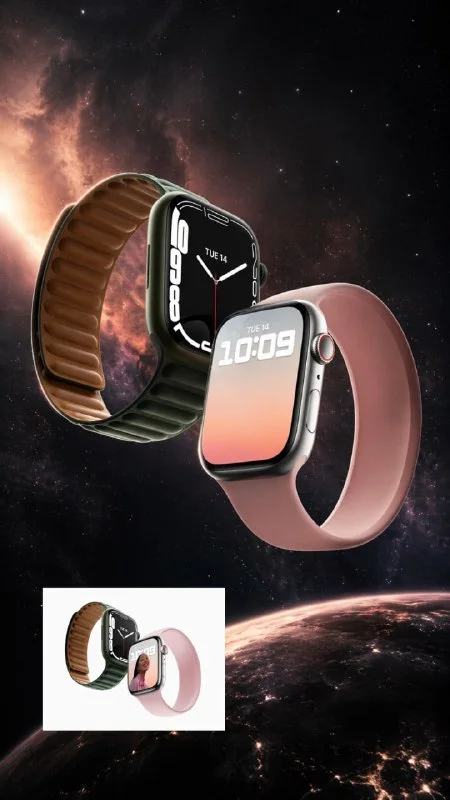
What is the purpose of an advertising frame?
A photo of a product using a neural network can become the basis of an advertising banner, post or additional card. In our example, the smartwatch is in a space scene: a dark background, stars, soft glow and directional light. This frame shows a visual idea, but does not replace an accurate photograph of the product's characteristics.
Before generation, determine where the text will be placed. If you plan to have a heading at the top, leave some space there. For a vertical ad, the object can be placed in the center, and the information can be added in separate blocks in the editor. Do not ask the generator to come up with the price, configuration or features of the device.
Preparing the original photo
Choose a photo where you can clearly see the body, screen, strap, and mounts. It's better to start with one object without overlapping arms or other objects. Severe blur and cut edges make it difficult to preserve details, because the generator will have to complete part of the shape.
If you have several angles, first take the one that suits the future composition. Do not ask to turn the clock completely upside down in the first request: when you change the angle, the system may come up with invisible sides. It is much easier to change the environment around an already suitable product position.
Open a tool that supports creating images from an uploaded photo. Attach the source and make sure it is available in the current request. One text prompt without a photo does not provide information about a specific device.
Ready prompt for a space advertising frame
This is a request from our publication about smart watches. He asks to keep the design, make a central composition and remove people and unnecessary objects.
Advertising shot of a watch on a space background
Create a visually striking advertising shot from the uploaded Apple Watch photo. Preserve the exact watch design. The Apple Watch floats in space like a futuristic luxury artifact. Subtle nebula glow and stars behind it, elegant light rays hitting the watch body. Centered heroic composition. Ultra realistic, cinematic, premium reflections, hyper detailed, sharp focus. No people, no clutter. 9:16If there is another product in the photo, replace Apple Watch with its name in both places. Then specify the environment for the task: for example, a quiet studio instead of space. Don't leave both the stars and the requirement for a clean studio background - choose one scene.
The phrase Preserve the exact watch design expresses the desired limitation, but does not guarantee accuracy. Even a convincing image may contain a fictitious button, an incorrect screen, or a modified mount. Therefore, the result must be compared with the source, and not accepted only based on the general impression.
What to check after generation
- Do the body shape and screen proportions match?
- Are the buttons, connectors and strap fastenings intact?
- Have the logo, markings and display images changed?
- Does the product have all the details visible in the original photo.
- Does the light create a false impression of color and material?
View the picture close up and next to the original. If the item has noticeably changed, asking again may help, but the number of beautiful options alone does not confirm accuracy. For advertising a specific model, this is a fundamental test.
A more manageable option: product separately, background separately
When it is important to preserve every detail, use the original photo of the product in a graphic editor, and assign only the background to the neural network. Remove the original backing, place the subject in the new scene and carefully match the light. This way the body, logo and screen remain part of the real photo.
First, choose a background with a close lighting direction. Then add a contact shadow or reflection if it matches the scene. Don't try to hide the mismatch of light with too much glow; the item may look pasted on top of the image.
Assembling an advertising layout
Add title, price and benefits manually using verified product data. Pick one main point and leave space around it. A wide banner will require its own composition, even if the original frame was vertical 9:16.
If you need a large, decorative heading, prepare it separately. Chrome-plated text can support a metal body, and frosted glass can support a calm, technological presentation. First check the readability and appropriateness of the effect, then add it to your ad.
Select the inscription for the next layout
For such an advertising frame, you can separately prepare an expressive title. Creative typography has 823 prompts with examples for inscriptions - metal, glass and other materials for different visuals.