
Prepare a photo to change the style
To turn a photo into anime or manga, you need a generator that can work with the downloaded image. Attach a photo, then submit one of the requests below. If you simply copy text without a photo, the system will not see the person, pose or original scene.
For the first test, select a photo with a clearly visible face, a clear silhouette, and without much blur. The more people and small objects in the frame, the more elements will have to be checked after stylization. It’s more convenient to start with one character and a simple composition.
Do not immediately change your pose, clothes, face, environment or perspective. First, compare the three styles in one photo. Then specify the selected option. This will help you understand what has changed due to styling and what has changed due to additional requests in the request.
Prompt: anime style photo
This query describes an emotional anime shot: expressive lighting, dramatic skies, air movement, and detailed backgrounds.
Photo in anime frame style
Turn this photo into an emotional anime opening screenshot, cinematic anime lighting, dramatic sky, Japanese animation aesthetic, wind effects, beautiful color grading, movie-like anime composition, emotional atmosphere, detailed anime background, ultra detailed, 4:5 composition
Dramatic sky changes the mood of the environment, while wind effects adds movement. For a calmer portrait, you can remove the wind and make the background more neutral. If you want to keep the original setting, explicitly ask that the main elements be kept instead of the new landscape.
Evaluate the face and pose separately from beautiful lighting. Style can greatly change eyes, proportions and facial expressions. If similarity is important, add a request to preserve recognizable features, but still check the result: a text restriction is not a guarantee.
Prompt: photo in black and white manga
The second version is based on lines, shadows and shading. Color is not needed here: the mood is created by contrast and pattern.
Photo in manga style
Turn this photo into a dramatic black and white manga panel, detailed ink drawing, screentone shading, dynamic speed lines, emotional anime expression, japanese manga page aesthetic, cinematic composition, hand-drawn linework, manga text bubbles, dramatic shadows, ultra detailed, 4:5 composition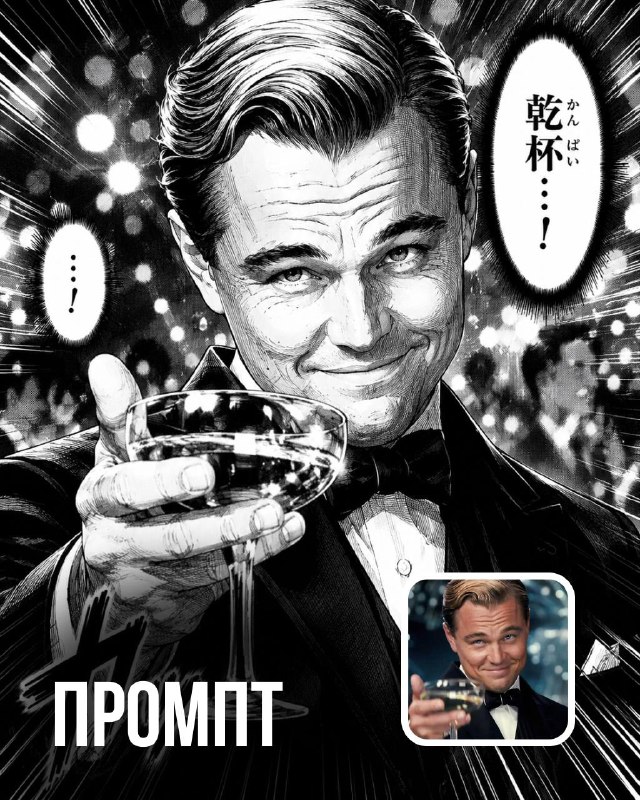
Screentone shading sets the tonal texture, and dynamic speed lines sets the feeling of movement. If you want a calm portrait, remove the speed lines. For a clean illustration without cues, replace manga text bubbles with a request to not add text clouds.
Do not consider the generated captions as finished text. They may contain random characters or may not match the desired phrase. It is better to add replicas and signatures for a real publication manually after processing the image.
Prompt: photo in the style of game promotional art
The third request directly describes the aesthetics of the GTA loading screen: sunset city, rich colors and character pose. This is an artistic stylization of photography.
Photo in the style of game promotional art
Turn this photo into a GTA VI loading screen artwork, cinematic sunset lighting, Rockstar Games aesthetic, dramatic character pose, Miami vibes, detailed background, luxury street atmosphere, vibrant colors, video game promotional art, ultra detailed, 4:5 compositionIf you want a more general gaming style without a specific series, replace the beginning with a description of the illustrated promotional art and remove the mentions of GTA VI and Rockstar Games. The remaining elements - sunset, urban background and rich palette - can be kept or adapted to suit your task.
Check if the generator has added unnecessary logos, weapons, vehicles or signs. They can appear as part of your chosen aesthetic, even if they are not needed by your layout. Clarify the restrictions or choose an option with a simpler environment.
How to select and prepare results for publication
Compare versions for a specific task: a recognizable portrait, an emotional cover or a story illustration. The most detailed shot is not always the best. In a small preview, the silhouette, face and main emphasis are more important.
Check hands, eyes, outlines of objects and text. Then prepare the trim to the desired format. The notation 4:5 composition describes the proportions of the composition; If the tool allows you to set the size separately, select it in the settings as well. Save the source and the finished result separately.
For the cover, add a title in the editor, leaving some white space around the face. The assembly procedure is described in the article about a poster with AI typography . If you're interested in preparing a scene before shooting, try storyboard from photography .
Select the inscription for the next layout
A stylized frame can be turned into a cover by adding a separate title. Creative TyPography contains 823 prompts for such inscriptions with ready-made examples. Several effects are available in a free demo.